Steven Ross
React Is Just Grown Up Legos — Hear Me Out
2020-07-28
React.js is an open-source JavaScript library for building user interfaces. That word, *building*, is the crux of my whole comparison here. As difficult as React felt to initially pick up, you’ll quickly learn that much like legos, building something in React can be an incredibly fun experience. So, let’s take a journey…
React has incredible documentation that opens up with three core principles. React is: declarative, component based, and is a tool that can be learned once and used anywhere. We’re going to focus on the first two. React being declarative essentially boils down to its ability to inject the proper JSX (an XML-like-syntax that renders web-views for you) at the appropriate time depending on your application. Being component based is where we start to see the lego comparison; these components allow you to break down your code into smaller, more digestible, and more legible plug-and-play type code in order to build very interactive webpages. For our example, we’re going to take a look at an application that was built to function much like a Pokédex (in fact, the only thing that was missing was the red, gameboy-like casing to really tie it all together).
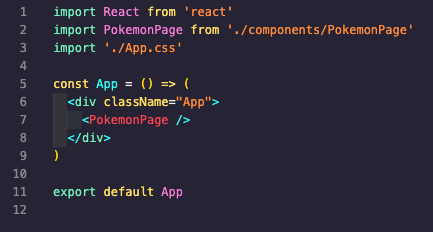
Above, you’ll notice our top-level App component that is going to house everything we build. We’re going to render this bad boy on our main JS file that will then render onto our webpage. What this ultimately allows us to do is utilize one element in our main HTML file (see below).

As well as our VanillaJS "getElementById" to render the React components.

Once you’ve made it this far you can start getting really clever with the rest of your components. Legos, typically, build from the ground up (I don’t know you or how you play with legos, so I’ll just assume you conform to the status-quo). Unlike legos, React builds from the top down, in that starting with the main component (in this case, <App />), there are child components all the way down. In our example above, the child of App is <PokemonPage /> which will house everything we need to pass down state/props to its children.
Side note: state and props are the actual core of React but in the essence of time we’ll just go over the TL;DR — state is anything within a class component that you will need to adjust on the fly (i.e. any data you’re pulling from an API or the values you’ll be changing in a controlled form); props are the pieces of the application that are passed from a parent to a child. Another quick metaphor for clarity: you can consider your eye color, height, hair color, etc to be the props you inherit from your parents, whereas your overall fitness, your sense of style, etc can be considered your state.
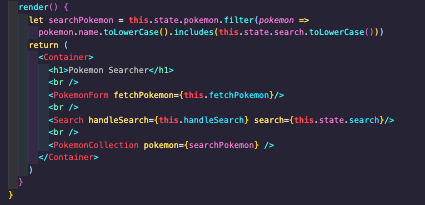
In our main container above, you can see a few more components start to manifest (<PokemonForm />, <Search />, <PokemonCollection />) that will continue to add more lego pieces to our application. As your application grows, you will have to make decisions regarding how the structure of the application should grow. Does this need to be a class component or functional component? Where should I hold state? Comparatively to VanillaJS, when you had to add event listeners to the document and target specific elements, React allows you to pass the functions that handle things like a click, submit, change, etc directly onto the component that needs it — which is a huge value add to both code structure and ease of use.
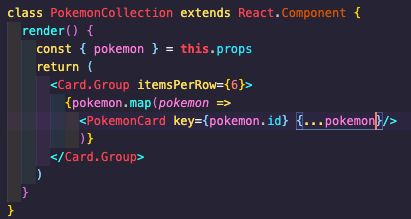
As we progress down the chain of ownership, we can render different JSX elements in order to accomplish the ultimate views we are looking for. In this case, we’re generating new “cards” to render each Pokémon in our database. Thinking ahead, if we came across a new Pokémon that didn’t exist in our app, we could build another component that allows us to submit a new entry. You’ll notice we built that functionality in this app (<PokemonForm /> in our main container), but rather than highlight more syntax, we’ll imagine that we can scale this application as we see fit…because legos.
When I think back to my childhood and the early days of playing with legos, I find the same level of excitement in building something from the ground up (or top down) when I’m playing around with a React application. Unless you’re like me and got the hand-me-downs from your older brother, most legos tend to come with a set of instructions. Typically, with React, before you start mashing the keyboard you’ll take the time to plan out a wireframe and lay out your webpage-to-be as a set of pre-development instructions. As your ideas grow and you start to think ahead for how the application might change, using React makes it very easy to continue to pile on the lego blocks (components) that will scale with your app. So, yeah, I don’t think we ever grow out of that phase of what makes playing with legos so fun, but our tastes and our tools definitely do change.